Stellar Blade PC Port Sony PS5 Game
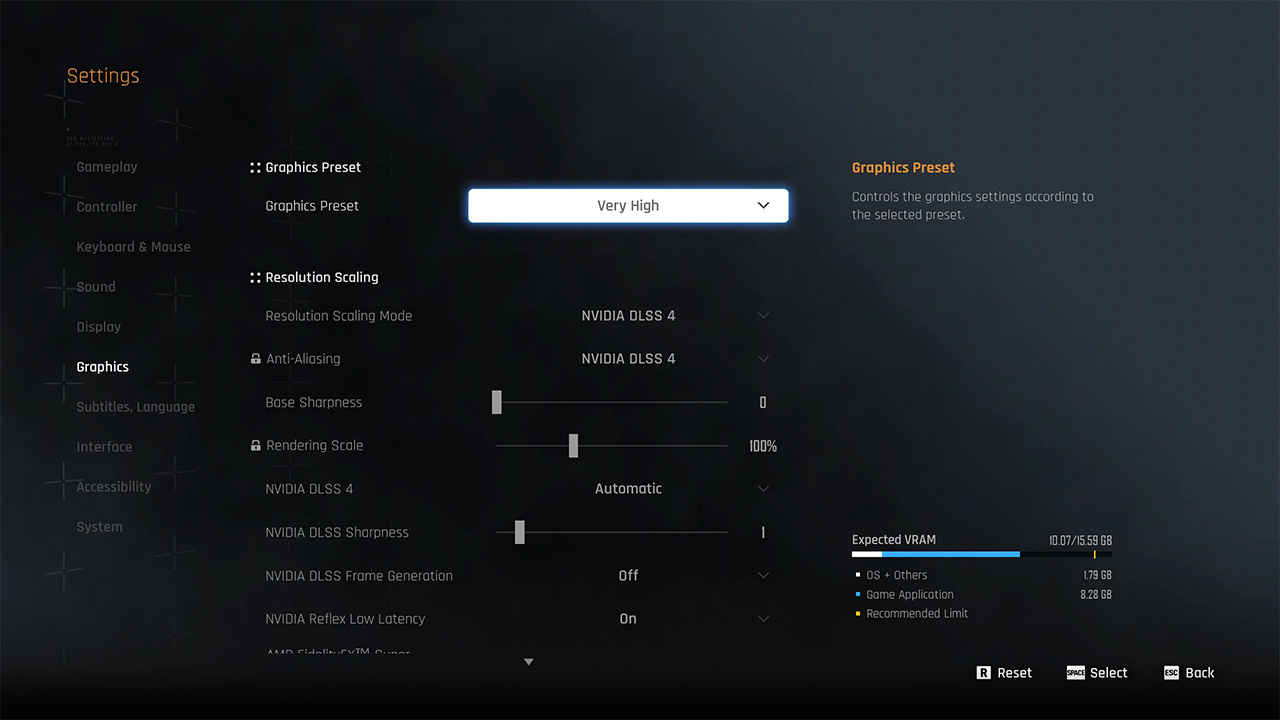
After months of anticipation and console exclusivity, Stellar Blade has finally landed on PC, and thankfully, it’s not a half-baked port. Built on Unreal Engine 4, the game comes with a decent set of graphics options, high-res textures exclusive to PC, and support for both DLSS 4 and FSR 3.0. While there’s no ray tracing or Intel XeSS, the overall visual fidelity and performance tuning are surprisingly solid. We benchmarked the game using three popular GPUs for mainstream and upper-midrange gamers: the NVIDIA RTX 5070 Ti, RTX 5060 Ti, and AMD’s new RX 9060 XT. Here’s how they stack up.
To keep things consistent and CPU bottlenecks minimal, all tests were run on a high-end rig:
The game lacks a built-in benchmark tool, so we tested each GPU using a repeatable run through the prologue/beach area, which is one of the more demanding sections early in the game. Settings were maxed out across all runs, including the 4K texture pack.
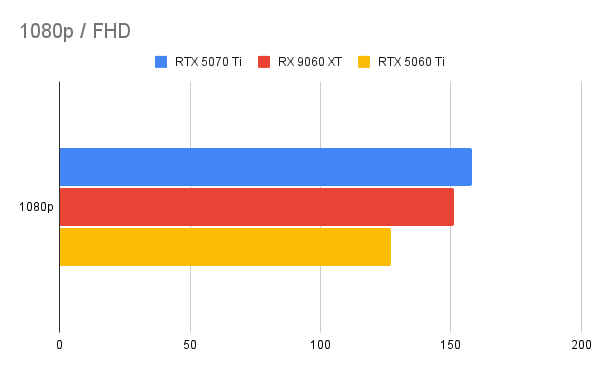
At Full HD resolution with maximum settings, all three cards handled Stellar Blade with ease.
Despite being a graphically rich game, Stellar Blade is well optimised at this resolution. Even the 5060 Ti, which is considered more of a 1080p-focused GPU, delivers well over 100 FPS. Interestingly, AMD’s RX 9060 XT performed slightly better than the 5060 Ti on 1% lows, resulting in smoother gameplay during cutscene transitions and combat-heavy moments.
There were minor shader compilation stutters during the initial 10 minutes, but these ironed themselves out quickly. Overall, Stellar Blade at 1080p is a great experience regardless of which of these three GPUs you’re using.
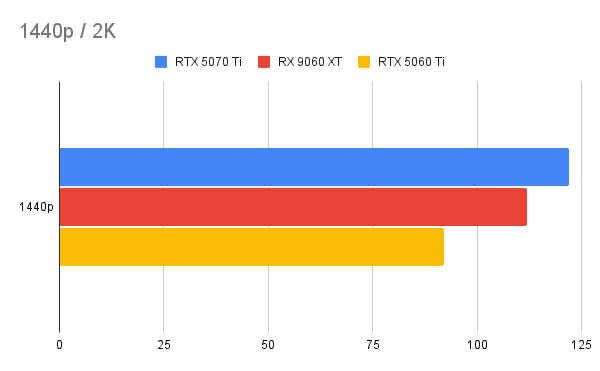
QHD resolution is where things start to spread out a bit more.
The RTX 5070 Ti continues to lead, especially in GPU-bound segments. It maintains triple-digit performance almost throughout. The RX 9060 XT holds its own nicely too, offering a very playable experience at 1440p without needing upscaling. The 5060 Ti, while starting to dip below 100 FPS more regularly, still performs admirably and can easily hit a locked 60 FPS with some headroom to spare.
If you’re using a 144Hz monitor, the 5070 Ti is the clear choice here. But if you’re happy with around 90 FPS, both the AMD card and the lower-tier RTX 5060 Ti will deliver without much fuss.
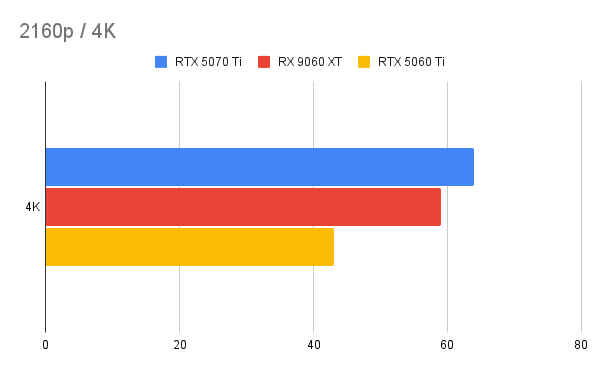
4K is where Stellar Blade starts to push these cards. Without upscaling, here’s how things looked.
The 5070 Ti was the only card among the three that hovered around the 60 FPS mark consistently at native 4K. The RX 9060 XT came close but dipped into the low 50s during heavy particle effects and large enemy encounters. Meanwhile, the RTX 5060 Ti starts to struggle here. Even so, enabling DLSS (Quality or Balanced mode) or FSR 3.0 quickly brings all three cards back into playable territory.
DLSS 4 on the 5070 Ti looked clean, with minimal artefacting and very little input latency. FSR 3.0 on the RX 9060 XT was competent as well, although not quite as refined in high-motion scenes. Either way, both upscaling solutions deliver the performance uplift needed to enjoy the game at 4K with most bells and whistles intact.
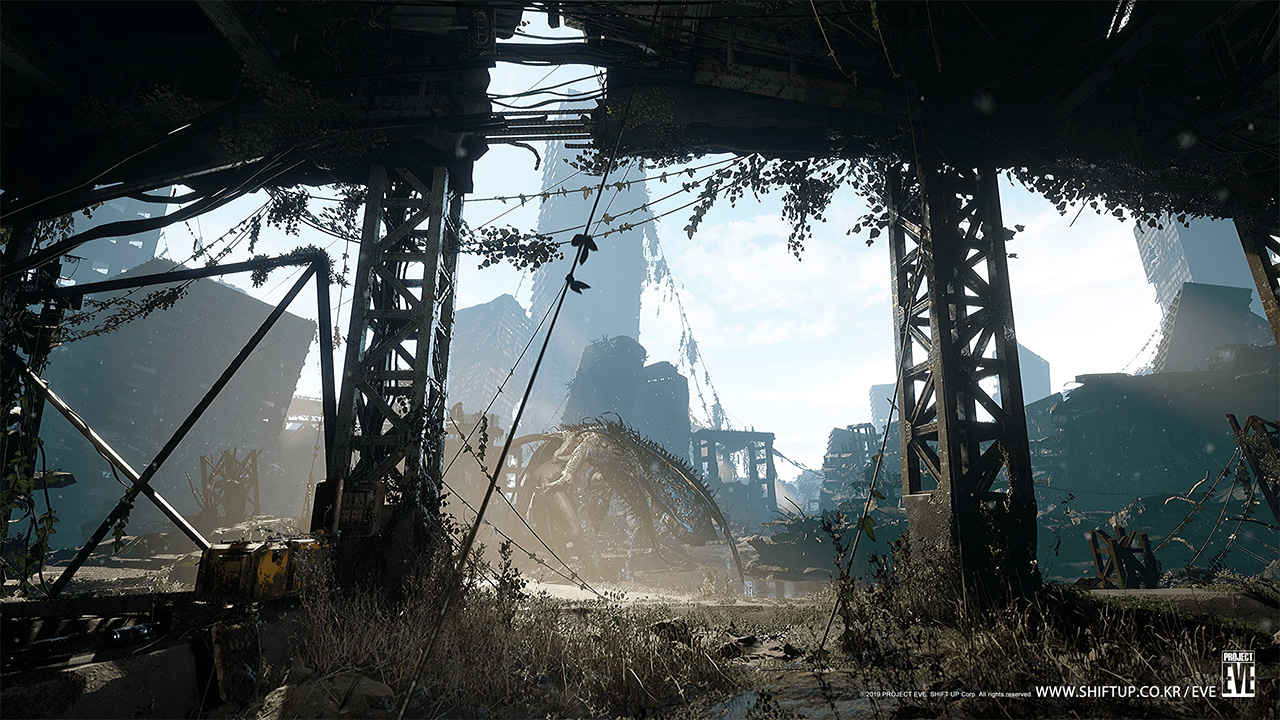
While Stellar Blade doesn’t push the boundaries of Unreal Engine 4, it looks consistently good. Texture quality is high, especially when the 4K pack is enabled and character models, particularly Eve’s, are sharply detailed. Environments feature dense foliage, glistening wet surfaces, and strong post-processing effects. However, there’s a noticeable absence of modern lighting techniques: no ray-traced global illumination, no RT shadows, and not even ambient occlusion options that go beyond screen space.
Still, the game’s art direction helps carry it. Clean, futuristic settings mixed with natural landscapes give Stellar Blade a distinct look without requiring excessive horsepower.
The keyboard and mouse controls are well-implemented, and aside from some shader compilation stutters during the first launch, the experience remains smooth and consistent. Even Denuvo, often the bane of PC performance, doesn’t seem to introduce any overhead or lag.
Stellar Blade on PC is a refreshingly competent port. It’s stable, scales well across a wide range of hardware, and supports upscaling tech out of the box. While it doesn’t offer any standout PC-exclusive graphical features, it also doesn’t come with any major performance caveats. For the GPUs we tested, the RTX 5070 Ti delivers the best experience at all resolutions. It’s the only one of the three that can flirt with native 4K60 without assistance and is perfect for 1440p high-refresh gaming. The RX 9060 XT impresses at 1080p and 1440p, holding its own even at 4K with FSR 3.0. Minimum framerates in particular were a strength here. The RTX 5060 Ti, while more modest, still manages solid performance at 1080p and acceptable results at 1440p. Just don’t expect 4K to be playable without DLSS.
With well-optimised Unreal Engine 4 performance and very few bugs or crashes, this is how a PC port should be done. Here’s hoping Shift Up considers adding ray tracing features in a future update—but even without them, Stellar Blade proves to be a slick and satisfying action title on PC. All things said and done, you don’t need a top-tier system to enjoy Stellar Blade, just a reasonably modern GPU, and maybe a bit of upscaling magic.